
Journeys APIs
Use the Journeys APIs to trigger journey flows and subflows — individually or in bulk — and to cancel individual journeys programmatically
Prerequisites
To call the APIs for Journeys, first obtain your organization's {orgId} and Bearer {Access Token}, as described in the API Authentication documentation.
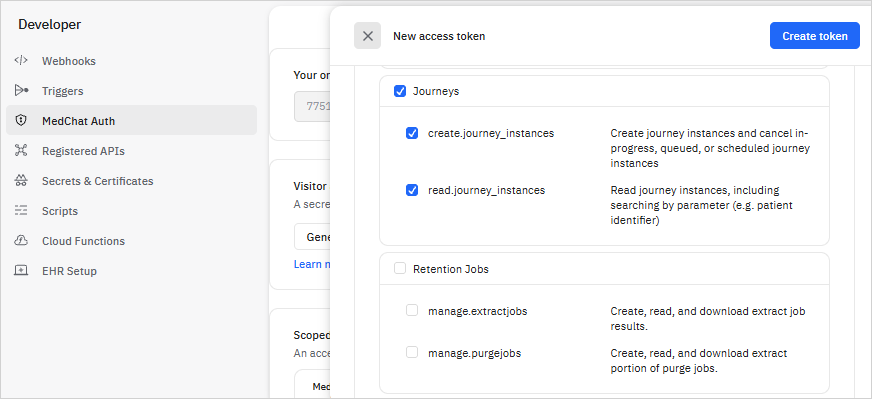
*Your Access Token needs to have the following scopes:
- create.journey_instances
- read.journey_instances
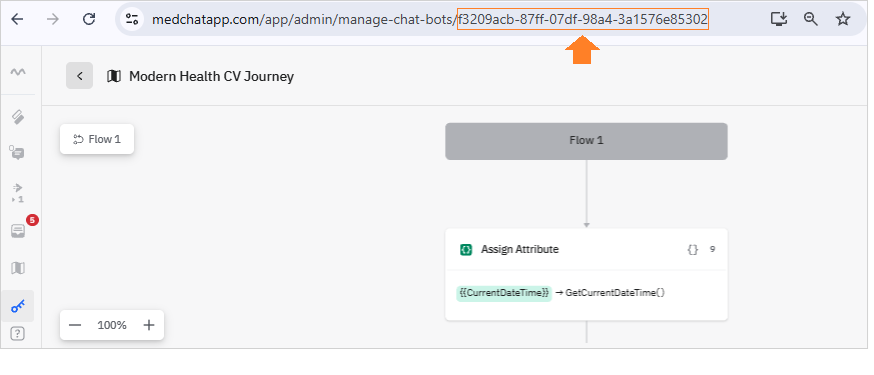
You'll also need the {chatBotId} of the Journey bot you'd like to trigger. You'll find this ID in the URL when viewing your Journey bot in Automation Studio. See sample image below:
Trigger Journey Flow
API documentation for the trigger journey flow endpoint can be found at Trigger a journey flow or subflow.
Request
The call is a POST to https://medchatapp.com/chatbotapi/external/orgs/{orgId}/journeys/{chatBotId}/instances/bulk, where {orgId} is your organization's ID and {chatBotId} is the ID assigned to the Journey that you'd like to trigger.
The JSON request body contains a couple of top-level properties and a list of instances to trigger:
{
  "flowId": null,               // null if triggering a main flow
  "timeZone": "America/Chicago" // IANA timezone to indicate the timezone that any datetime parameters are represented as
  "instances":
  [
    {
      "parameters" :
      {
        "patientId": "100000",
        "patientName": "John Smith",
        "appointmentId": "40-XYZ-11123",
        "appointmentDateTime": "2023-12-01 08:00:00"
      }
    },
    {
      "parameters":
      {
        "patientId": "100001",
        "patientName": "Jane Green",
        "appointmentId": "92-XBX-11934",
        "appointmentDateTime": "2023-12-01 08:30:00"
      }
    }
    ...
  ]
}flowId- Should benullwhen triggering a main flow. Provide the subflow ID when triggering a journey subflow.timeZone- The TZ identifier of the IANA timezone that any provided datetimes are represented in. If all provided datetimes are in UTC, specify"UTC". Required if there are any datetime parameters on the journey.instances- An array of instances that should be triggered, each with its unique set of parameters.parameters- A dictionary of strings representing the parameter values for the instance to be used when triggering the journey flow. There should be one key/value pair for each attribute configured as a parameter on the journey.
Triggering Journey subflowsThe same endpoint for triggering a journey main flow for new instances is used to trigger a journey subflow on existing instances. The only difference is the subflow ID must be provided as
flowIdin the request when triggering a subflow.Existing instances will be identified using the "Instance identifier" parameter(s) in the
instancesarray.
Response
Expect a 204 - No Content response on a successful call.
If there is a problem with the request, the API will return a 400 - Bad Request with an array of error messages.
Get a specific Journey Instance
To get details about a specific Journey Instance -- including its id -- use the following endpoint with your known {parameter} and {parameter value} to perform the search.
POST https://medchatapp.com/chatbotapi/external/orgs/{orgId}/journeys/{chatBotId}/instances/search
Body:
{
    "filterSpecification":
        {
            "type":"AndSpecification",
            "specifications":
            [
                {"type":"JourneyParameterSpecification",
                "parameterName":"{parameterName}",
                "operator":"equals",
                "rightOperand":"{parameterValue"}
            ]
        },
       "includeParameters": true
}
For example, if you're searching for a parameter of 'PatientName' with a value of 'George Harris', then the call would look like this:
POST https://medchatapp.com/chatbotapi/external/orgs/{orgId}/journeys/{chatBotId}/instances/search
Body
{
    "filterSpecification":
        {
            "type":"AndSpecification",
            "specifications":
            [
                {"type":"JourneyParameterSpecification",
                "parameterName":"PatientName",
                "operator":"equals",
                "rightOperand":"{George Harris}"}
            ]
        },
       "includeParameters": true
}
Cancel Journey Flow via API
Use the following call for canceling the Journey flow:
DELETEhttps://medchatapp.com/chatbotapi/external/orgs/{orgId}/journeys/{chatBotId}/instances/{journeyInstanceId}/execution
You'll need your Journey chatBotID and journeyInstanceID to cancel a specific instance.
- JourneyInstanceID: This will be the
'id'you retrieved from the Get specific Journey instance endpoint above. See sample Response Body below -- the Journey Instance ID is the first parameter you'll want to use:
[
    {
        "id": "81110ff3-061a-a14b-bb44-3a213b29205b",
        "journeyBotName": "Modern Health Journey",
        "createdDateTime": "2026-05-15T00:14:42.7796427Z",
        "startDateTime": "2026-05-15T00:14:42.9265125Z",
        "journeyBatchId": "09e8b38e-4a24-80e4-82b5-3a213b29204e",
        "status": "InProgress",
        "lastStepExecuted": {
            "eventDateTime": "2026-05-15T00:14:44.6881125Z",
            "flowName": "Flow 1",
            "stepId": 10
        },
        "parameters": {
            "PatientName": "George Harris",
            "PhoneNumber": "5554128879"
        }
    }
]
Please reach out to your Medchat solution designer or [email protected] for assistance.
Updated 5 months ago